Shelterluv documents an Excel report download. Animal Shelter Manager documents filtered animal CSV files, and its hosting service also describes a downloadable database snapshot. Each gives a shelter director a different piece of evidence when deciding whether the team can move an animal’s history to another system.
Shelter software data export · Two products · Public documentation checked November 25, 2026 · Decision guide for U.S. shelter and rescue managers.
What the shelter software data export instructions establish
Imagine a former adopter calls the morning after a software change. She has the name her family gave the dog and the date she brought him home. The intake team used a different name, and the dog had spent time in foster care before adoption. The practical question for the director who approved the change is whether a staff member can find the right dog, trace the placement and retrieve the paperwork the family needs. Opening a spreadsheet answers only the first part of that question, and only if the right dog appears there.
Paws & Spells reviewed three public pages for two products used in shelter management. Shelterluv’s FAQ identifies a report download that staff can open in Excel. The Animal Shelter Manager configuration manual describes animal and person CSV exports and how its importer handles selected fields. The sheltermanager.com hosting FAQ describes access to a database snapshot and the timetable after a missed renewal. We checked all three on November 25. Animal Shelter Manager, abbreviated ASM below, is the software. The hosting FAQ applies to the hosted service.
We selected these pages because each names an output an administrator can request. We recorded the object exported, the controls the publisher describes and the next operation the documentation supports. The unit of comparison is a documented workflow. The sample contains two products and three selected routes. Those are our counts of the entries compared here. We did not count every export option, sample individual U.S. shelters, use a customer account or run an import. The date identifies when we read the pages. It does not date the introduction of a feature.
| Published route | What to request in a trial |
|---|---|
| Shelterluv · Excel report | A named report, its filters and a record that should appear. |
| ASM · animal CSV | Separate runs for current and historical animals. Compare IDs. |
| Hosted ASM · database snapshot | A copy opened in a separate environment, with one case traced through it. |
A report can answer a narrow question precisely
For a director who needs a spreadsheet for a board meeting, Shelterluv’s FAQ supplies an actionable starting point. Ask the reporting lead for the particular report behind the number on the agenda. Record the reporting period and the filters alongside the file. Then ask the person who prepared it to point to one animal that belongs in the result and explain why. A correct total can conceal two errors if one eligible record is missing and one ineligible record takes its place.
The same report may serve a different purpose when a shelter changes systems. Suppose the board asked for completed adoptions in October. A file built to answer that question could be exactly right even though it omits a dog still in foster care on October 31. If the migration team later treats the adoption file as an inventory, that deliberate exclusion becomes a gap. The manager can prevent the mix-up by keeping the report question with the saved file. A label such as “October completed adoptions” tells a future reader much more than “final export.”
Shelterluv’s public answer establishes that a team can download reports into Excel. It leaves open which columns a particular report includes and how a recipient would retrieve a signed document connected to a row. We did not infer an unavailable feature from the brevity of the FAQ. A team evaluating a move can take the file it actually expects to receive and ask its receiving administrator to locate the fields needed for that former adopter’s call. Record the fields found and the ones that need another source.
In ASM, the animal filter changes who is in the file
ASM’s manual distinguishes the whole animal database from animals currently on shelter and a selection of current animals. It also describes a separate person export. A roster for the next shift and a historical transfer can therefore begin with the same animal export screen and require different selections. If the director needs the history of animals that have already left, the choice of population belongs in the transfer instructions. A filename with today’s date gives no indication of which population the operator selected.
One way to verify the choice is to select a known closed case before running the export. Record its animal ID and the event that makes it a closed case. Also select a current resident. Run the export appropriate to the job, look for both IDs, and compare the result with the expectation for each. Investigate a missing current resident even if the closed case appears as expected. These two checks catch different problems. Neither establishes that every animal is present.
The ASM manual also gives a reason to inspect values after an import. It explains that missing inputs can trigger defaults, including for animal type, and that the importer can use age information when a birth date is absent. A receiving screen with a populated field can therefore look more complete than the source evidence. For a trial inside ASM, include a record with a deliberately unknown value and compare its meaning before and after import. For any other receiving product, establish its own behavior in that product. ASM’s rules describe its importer.
A database snapshot puts a different job on the calendar
The hosted ASM FAQ identifies a downloadable database snapshot. It also says an unrenewed account becomes read-only 24 hours after the renewal date and describes a seven-day opportunity to take a copy before removal. These are timings published by the hosting provider. We have not added the two intervals together to derive a particular shutdown hour. A director planning a departure can put the rehearsal before renewal and confirm the account’s actual cutoff before assigning anyone a final shift.
A snapshot gives the person responsible for recovery a concrete item to request. Once it arrives, someone still has to show how staff will read it. For the former adopter’s inquiry, a useful demonstration ends with the receiving worker locating the case independently. Have the worker start from the information a caller would reasonably have. Then record whether the worker found a unique match, what evidence linked the old and new names, and where the associated document could be opened.
A photo visible on a source screen deserves a separate check. Record whether the delivered copy contains an image file, a reference to another location, or neither. If an image opens while the reviewer is signed in to the old account, repeat the check in the approved receiving environment without that session. A link can look convincing while the old account is doing the work. The reviewed pages do not establish that a particular shelter’s attachments would pass this test in either product.
Count animals and events separately during the rehearsal
Consider a small invented test case. One dog enters care, goes home, returns and goes home again. Another dog enters care and stays. The team has two distinct animals and two completed adoptions, both involving the first dog. A report of completed adoptions might contain two rows, just as a list of unique animals might contain two rows. If the team checks only the total, both files appear to agree. Comparing their animal IDs reveals that the reports answer different questions.
For a repeatable test, write down the expected units before anyone opens the file. Count distinct animal IDs for the roster, then count dated placement events for the animal with a return. If the receiving system issues fresh IDs, preserve a lookup that connects each old ID to the corresponding new one. Check the event dates in sequence. When two records share a name, use a second identifier tied to the source record. This example illustrates a possible counting error. It supplies no estimate of error rates in either product.
Team exercise before approving a move
Have an intake lead choose three authorized test cases: a current resident, a closed adoption with paperwork, and a returned animal with more than one placement. Give the receiving administrator the expected IDs, event dates and document descriptions. Have a different staff member find each case in the trial destination and record what opened. Use synthetic cases or an approved restricted environment.
For each case, record the source selection, expected result, observed result and person responsible for any unresolved item. Approve the specific workflow that passed. If the team still cannot reopen the adoption agreement, keep document transfer open as a separate decision.

FREE EXCEL WORKSHEET
Shelter Data Transfer Acceptance Worksheet

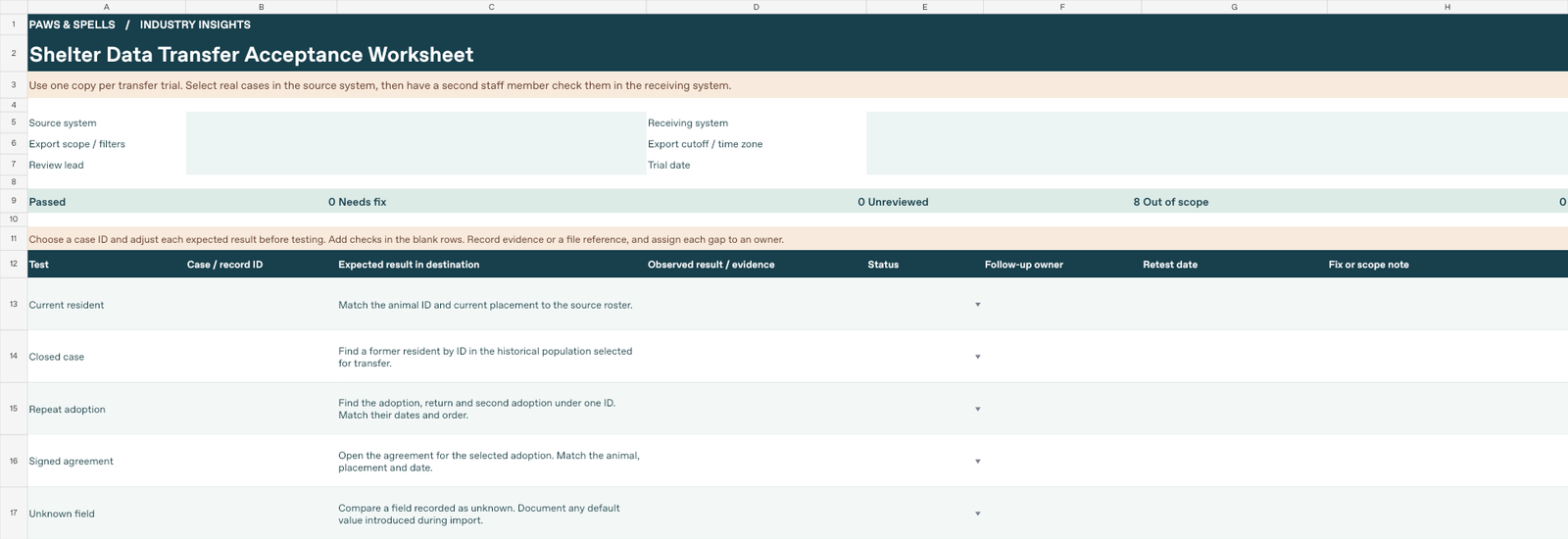
Use eight checks to compare selected records before and after a trial transfer. Record what staff find in the new system, assign follow-up work, and document which workflows the director can approve. Open the editable workbook in Excel or import it into Google Sheets.
What the director can sign off
A limited approval can be useful. If the board needs a monthly adoption table and the reporting lead reconciles its IDs and dates, the director can approve that reporting workflow. If the next shift needs a roster of residents, the intake lead can sign off on the population and the time the roster was run. For a system change, the director needs evidence from the place staff will actually work tomorrow. A successful trial in one destination does not establish compatibility with another.
Leave room for changes made between the trial and the final transfer. A dog could leave foster care after the practice file was produced. Note the cutoff used for the final export and assign a staff member to account for later events before the receiving roster goes live. Ask that person to reconcile the few records touched during the handoff as well as the overall count. That gives the incoming shift a named contact and a clear point in time for interpreting a discrepancy.
The public evidence supports putting specific deliverables on the meeting agenda: a report with a stated scope, a file covering the intended animals, or a snapshot that someone can read independently. Choosing a vendor, estimating staff hours or deciding that all history can move requires evidence from the shelter’s own account and destination. The most informative item to bring to the approval meeting is the completed case check, including any document or event the next shift still cannot find.
Cover: AI-generated editorial illustration of a shelter records review.